Never Retrofit BMW E90 Apple CarPlay Without This Guide

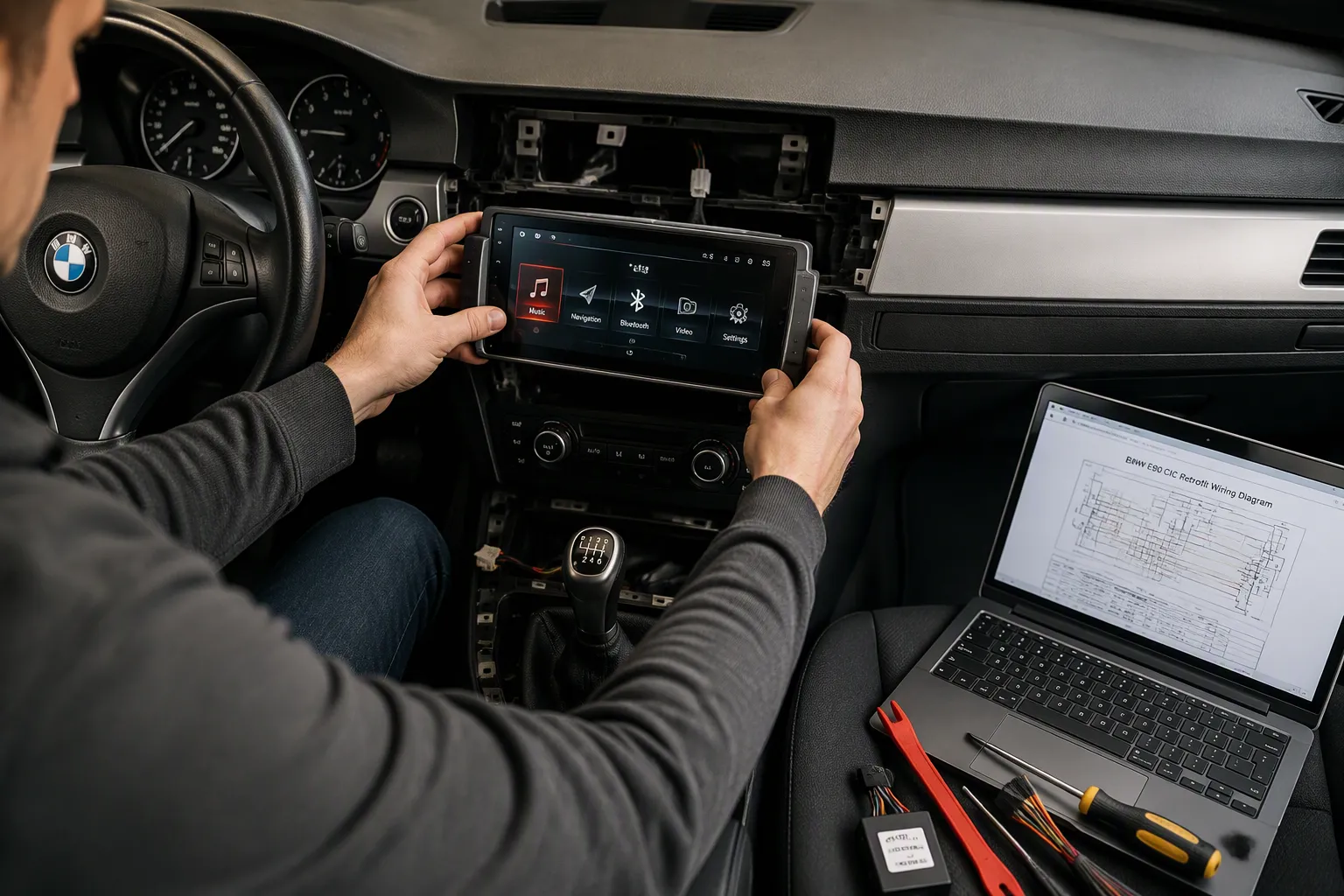
Yes, you can retrofit Apple CarPlay into a BMW E90. You probably have a few worries though. Will it fit your car? Can you still use the iDrive controller? How much will it cost? Is the install hard? Will your original features survive?
You are not alone. Plenty of owners ask these same questions. The good news is that a bmw e90 apple carplay upgrade is simpler than you think.
This guide helps you check your CCC or CIC system, pick the right kit, and fit it without cutting any wires.
Key Takeaways
Check your BMW E90 iDrive system first. CCC models (2005-2008) use a direct-fit Linux screen. CIC models (2009+) use an MMI module or head unit replacement.
Choose the right kit for your car. CCC cars get an 8.8-inch Linux screen. CIC cars get an MMI module or a new head unit.
Install the kit without cutting wires. The kit uses factory connectors. You need basic tools like trim removal tools and a Torx screwdriver.
Keep all original features. Your iDrive controller, steering wheel buttons, reversing camera, and audio system still work.
Test everything before reassembling. Check CarPlay, calls, cameras, and audio. A loose cable causes most problems.
Check Compatibility with Your BMW E90
Identify Whether Your E90 Uses CCC or CIC iDrive
Before you buy anything, you must find out which iDrive generation is in your dash. This one detail decides every other choice.
BMW made the E90 in two types. Models from 2005 to 2008 use the CCC system. Cars from 2009 onwards use the newer CIC system. Look at your screen to tell them apart. The CCC unit has a small monochrome display with buttons around it. The CIC unit has a wider, high-resolution colour screen with a single knob.
If you own a 2005-2008 E90 with CCC, you have the best retrofit path. A direct-fit 8.8-inch Linux screen replaces the original display. It adds wireless Apple CarPlay and bolts straight in using the factory harness. No coding. No wire cutting. The screen boots in about five seconds.
CIC cars take a different route. An MMI module connects to your existing screen. It adds CarPlay without swapping the display. Some drivers prefer a full head unit replacement for a larger screen or a new interface. Either option works; the MMI module keeps factory controls intact.
Original Functions You'll Keep After the Retrofit
A good retrofit should never take away the features you already love. The whole point of a bmw e90 apple carplay upgrade is to add modern convenience without losing the car's character.
Your factory iDrive controller still operates the new screen. You can scroll, click and navigate through CarPlay as you would through original menus. Steering wheel buttons handle volume, calls and voice commands. The radio and factory amplifier stay in the signal path, so audio quality stays identical.
Your reversing camera still appears on the display. Door open warnings and other alerts show up as normal. Because the Linux screen never touches the vehicle control unit software, the car doesn't know anything changed. Everything you rely on daily just keeps working.
Take a quick look at your screen before buying. Choose the right kit, and the install becomes a simple weekend job.
Choose the Right BMW E90 Apple CarPlay Retrofit Kit
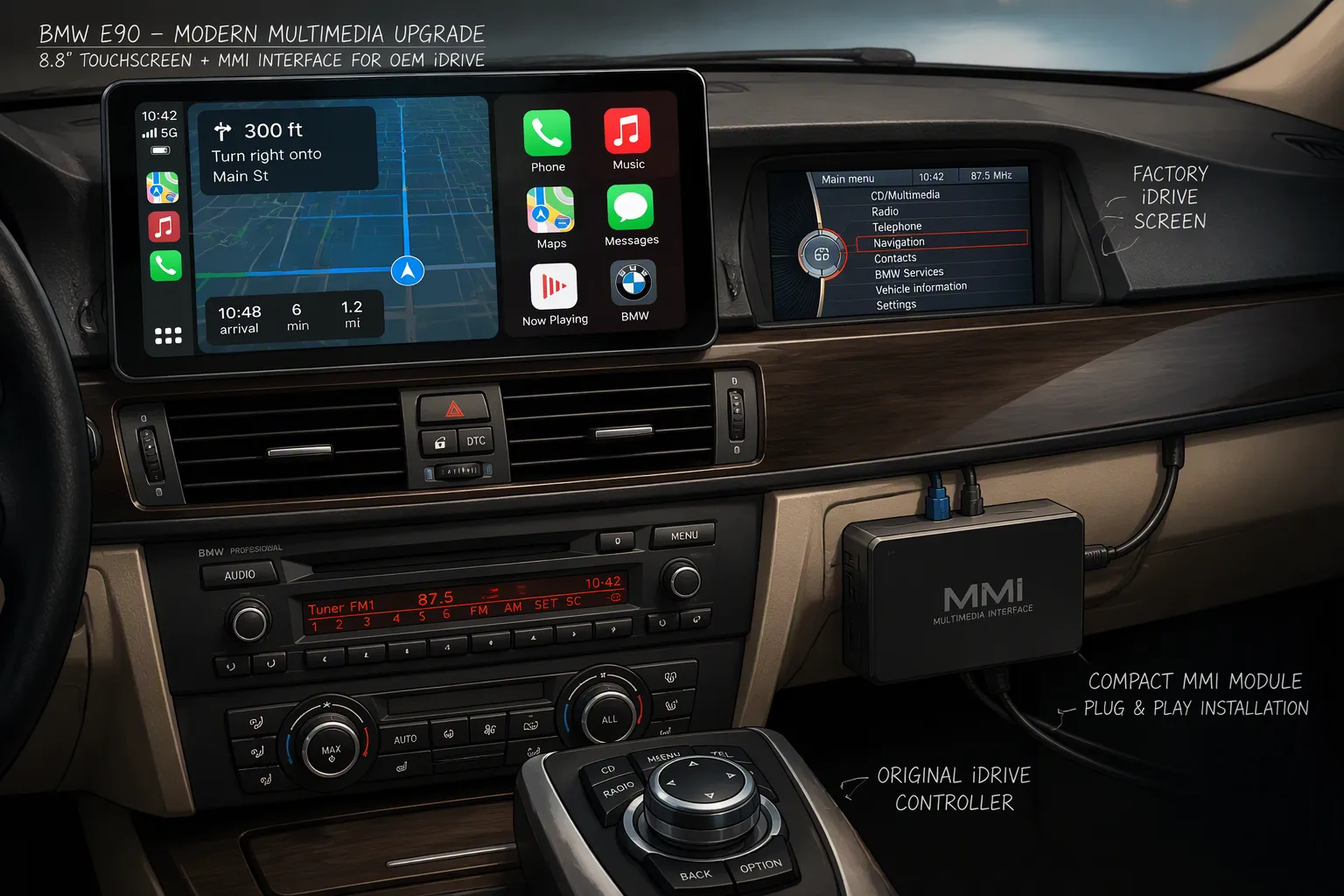
You've checked your iDrive version. Now you need to pick the kit that matches it. Get this wrong and you'll waste money on parts that don't fit. Get it right and your bmw e90 apple carplay upgrade becomes a straightforward job.
Direct-Fit Linux Screen for CCC Models
Own a 2005-2008 E90 with the CCC system? This is your best option. The 8.8-inch Linux screen replaces your factory display completely. You get a 1920x720 touchscreen that looks sharp and responds fast.
The screen runs on Linux. That means it boots in about five seconds. You won't sit there waiting while your phone connects. Wireless Apple CarPlay, Android Auto and Mirrorlink all work without plugging in a cable.
Here's the clever part. The screen keeps every original function intact. Your factory radio still plays. The amplifier still powers your speakers. The iDrive joystick still controls everything. Factory command buttons and steering wheel controls work as normal. Door open warnings appear on screen. Your reversing camera still shows up when you shift into reverse.
The install uses the original car cables. No wires get cut. No software gets changed. The car's control unit never knows anything happened.
MMI Modules and Head Unit Replacements for CIC Models
Got a CIC car? You have two paths. Pick the one that suits your budget and your appetite for a bigger screen.
An MMI module connects to your existing iDrive screen. It doesn't replace the display. Instead, it slots between the head unit and the glovebox area. The module adds wireless Apple CarPlay while keeping your factory screen and controller. Bimmertech MMI Prime is one option here. It provides wireless Apple CarPlay and works with BMW CIC iDrive systems. It connects to the vehicle's original iDrive screen and uses the factory iDrive controller. The source notes it supports older-generation BMWs including E90 and E92 models. This route suits you if you want to keep the dash looking stock.
A full head unit replacement takes a different approach. You swap the entire unit for a larger display and a new interface. This appeals to drivers who want a bigger screen or a completely different look. The trade-off is more work during installation and a bigger change to your interior.
Think about what matters most. Do you want to keep everything looking original? Go with the MMI module. Do you want a larger, more modern display? Consider the head unit swap.
Either way, your bmw e90 apple carplay system will work with the controls you already know. The iDrive controller, steering wheel buttons and factory command buttons all stay in play.
Pick your kit based on your iDrive generation. CCC cars get the direct-fit Linux screen. CIC cars get the MMI module or a head unit replacement. Match the kit to your car and the rest of the install falls into place.
Gather the Plug-and-Play Parts and Tools
Everything Included with the Linux Screen
Open the box and you'll find the 8.8-inch replacement display sitting right on top. Underneath it, the kit packs every cable you need for the job. That includes the main harness, the video connection and the power leads. You don't need to hunt down extra adapters or order anything separately.
Here's the bit that matters most. The kit reuses your factory harness. You plug the new cables into the car's existing connectors. Nothing gets cut. Nothing gets spliced. The whole setup stays non-destructive, so you could return the car to stock later if you ever wanted to.
The package also includes the mounting hardware and brackets. These let the screen sit flush in your dash. The design matches the interior styling of the E90, so it looks like it belongs there. Take a minute to lay everything out before you start. Check each cable against the instructions. A quick inventory now saves you a mid-install panic later.
Basic Tools Needed for Installation
You won't need a workshop full of gear. A few simple tools cover the whole job:
Plastic trim removal tools for prying off dashboard panels without scratches
A Torx screwdriver for the factory bolts holding the display and head unit
A soft cloth or dashboard protector to rest parts on and avoid scuffs
That's honestly it. No soldering iron. No wire strippers. No coding laptop.
Set your tools out before you touch the car. Work in a clean, well-lit space if you can. Keep a small container nearby for the screws you remove. Those little bolts love to roll under the seat. Trust me on that one.
Once your parts and tools are ready, you're set for the fun part. The next section walks you through the actual install, step by step.
Install the Screen Without Cutting Wires
Remove the Original Display and Head Unit
Grab your trim tools and let's get started. The dash comes apart easier than you'd think.
Start by prying off the dashboard trim around the display. Work slowly and use the plastic tools. Metal tools will scratch the surface. Once the trim pops free, set it somewhere safe.
Next, you'll see the bolts holding the original display. Use your Torx screwdriver to remove them. Keep those bolts in your container. Now ease the head unit forward. It slides out toward you, but don't yank it. The cables behind it need room.
Here's a heads-up for some E90 owners. You might need to trim a corner of the radio bracket. This lets the new hardware sit correctly. Check the fit before you force anything. A small trim now saves you a big headache later.
Fit the New Screen and Reassemble the Dash
Now comes the satisfying part. Connect the new screen temporarily before you bolt anything down. Plug in the main harness, the video cable and the power lead. The factory connectors click into place. No wires get cut. That's the beauty of this bmw e90 apple carplay setup.
Switch on the ignition. Wait about five seconds. The Linux screen boots fast, so you won't sit there twiddling your thumbs. Check that CarPlay appears. Try the iDrive controller. Tap a few buttons.
Does CarPlay not show up? Don't panic. Check that every connector is fully seated. A loose plug causes most issues. Push each one in until it clicks.
Once everything works, refit the trim. Line up the clips and press gently. The screen should sit flush in your dash. It matches the interior styling, so it looks factory-fitted.
Not comfortable doing this yourself? Professional installation is always an option. Many shops handle this job in a few hours.
Take your time here. Rushing leads to scratched trim or loose cables. Test before you fully reassemble. That way, you won't need to pull everything apart again.
Test the System and Skip Coding Completely
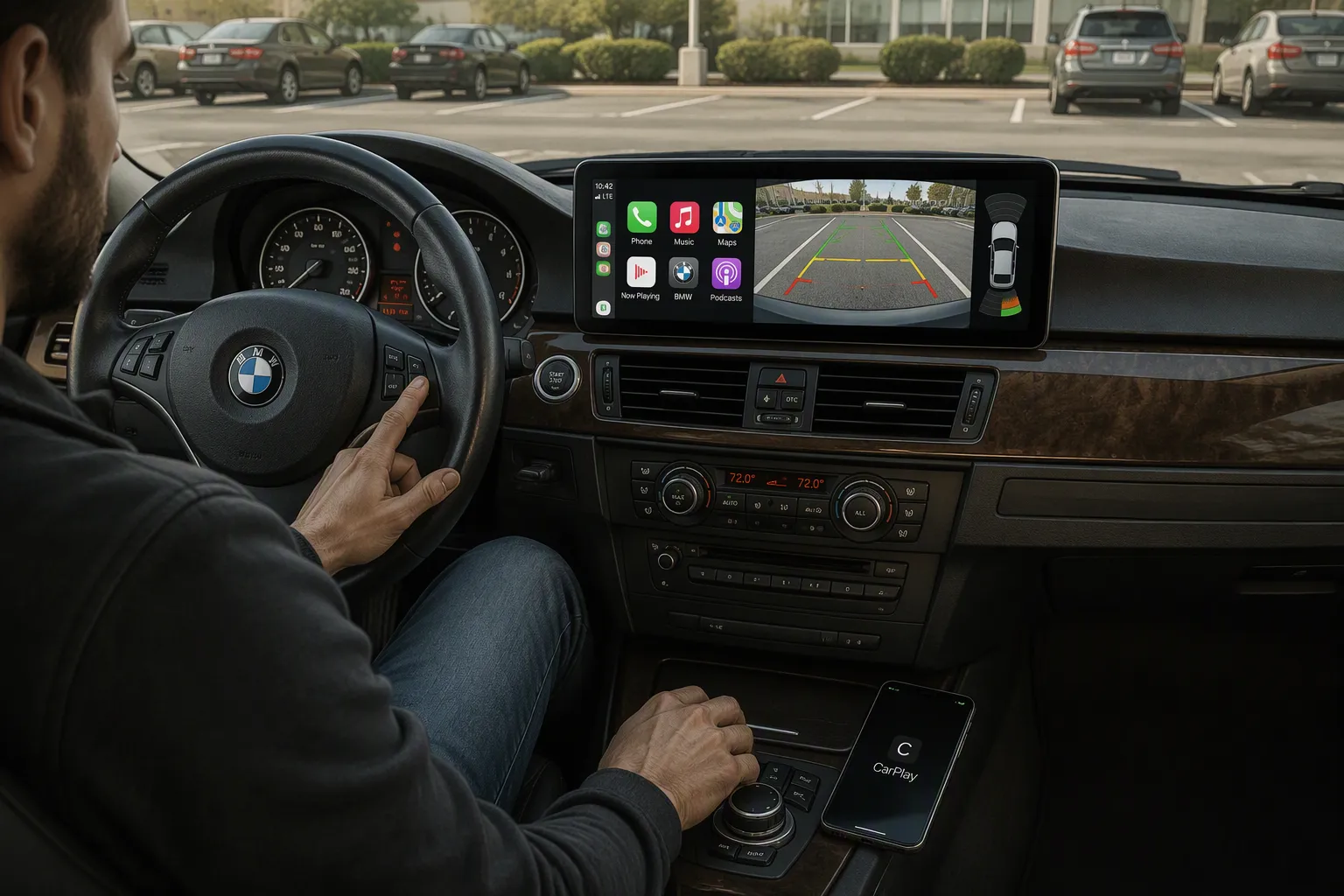
Here's the best part. The Linux screen never touches your vehicle control unit software. That means no coding. No programming. No dealer visits. You fit the screen, switch on the ignition, and everything works. This bmw e90 apple carplay upgrade leaves the car's brain completely untouched.
Confirm CarPlay, iDrive Controller and Steering Buttons
Start with your phone. Pair it wirelessly, then watch CarPlay appear on the new display. It boots in about five seconds, so you won't wait long. One customer confirmed the connection stays stable in regular use. CarPlay doesn't show up? Check every connector. A loose plug causes most issues.
Now test Siri. Press the voice button on the steering wheel. Ask Siri to send a message or start navigation. Google Assistant works the same way. Place a quick test call next. The built-in Bluetooth microphone handles hands-free audio. Check the sound on both ends. Clear audio means everything sits correctly.
Don't forget the iDrive joystick. Scroll through CarPlay menus. Click to select an app. The factory controller works exactly as before. Steering wheel buttons adjust volume and answer calls. Factory command buttons around the screen also respond.
Check Cameras, Parking Sensors and Audio Quality
Shift into reverse. Your reversing camera should appear on the display right away. Parking sensors still beep and show their usual warnings. Open the driver's door and watch for the door open warning on screen. These details confirm your factory systems remain intact.
Now play some music. Use Bluetooth audio, the radio, or a connected phone. Listen through the factory amplifier. The sound should feel identical to your original setup. One verified buyer found no sound at all after installation. The culprit? An incorrectly seated fibre optic cable. Hear silence? Check that cable first. Reseat it and the audio returns.
This bmw e90 apple carplay screen keeps every original feature alive. Take a few extra minutes to test each item. Do it before you refit the trim. That way, you won't pull the dash apart twice.
You've checked your iDrive generation, chosen the right kit, and fitted it without cutting wires. Now you stand with a modern bmw e90 apple carplay setup that still feels like your car. That's the real win. You keep the factory controls, the amplifier, and the original character. You add wireless CarPlay that boots quickly and works with the joystick.
Take your time during the install. Test every function before you refit the dash. Check CarPlay, calls, cameras, and audio first. A loose cable is the usual culprit. Once everything works, reassemble gently. You'll wonder why you waited.
Listen to your favourite playlist through the factory speakers. Then enjoy the drive.
FAQ
Will CarPlay work in my 2005-2008 E90 with the CCC system?
Yes. The 8.8-inch Linux screen is a direct fit for those cars. It replaces your factory display and adds wireless CarPlay, Android Auto and Mirrorlink. The unit boots in about five seconds. Your original radio, amplifier and iDrive joystick all keep working.
Do I need to code or program anything after fitting the screen?
No. The screen never touches your vehicle control unit software. You plug it in, switch on the ignition, and CarPlay appears. No coding laptop, no dealer visit, no programming session. That's why this route suits owners who want a clean, reversible upgrade.
Can I still use the iDrive controller and steering wheel buttons?
Absolutely. The factory joystick scrolls and clicks through CarPlay menus just like it does through original menus. Steering wheel buttons handle volume, calls and voice commands. The factory command buttons around the screen respond too. Nothing about your daily controls changes.
What happens if CarPlay doesn't appear after installation?
Check every connector first. A loose plug causes most problems. Push each one in until it clicks. If you hear no audio, reseat the fibre optic cable. That single cable explains most silent setups. Test everything before you refit the dashboard trim.
Will my reversing camera and door warnings still work?
They will. Shift into reverse and your camera feed shows on the display. Parking sensors beep as usual. Open a door and the warning appears on screen. Your factory systems stay fully intact, because the retrofit only swaps the display, not the car's brain.
See Also
Upgrade Your BMW Interface With Wireless CarPlay Retrofit Solution
Guide To Adding Apple CarPlay To Your 2017 Audi Q5
CarPlay Retrofit For Audi A5 2009 To 2015 MMI 2G System
Installing Apple CarPlay And Android Auto On Audi A4 2013 To 2016 Screen